

Disclosure: we may earn a commission if you buy through links on this page. It does not change the price you pay.
This is an independent coupon site. It is not owned by, run by or endorsed by Omnisend.
Last verified 20 October 2026 by Roshan Jha. I checked official pages only. Prices are in USD. The full list is under Sources.
Short answer: Omnisend is a fairly priced email and SMS tool for stores. It has a free plan and paid plans from $16 a month. Support runs 24/7 on every plan. SMS now needs Pro for new users. It suits most small and mid size stores. Very large brands may want deeper analytics.
Omnisend review summary
| Area | My rating | Notes |
|---|---|---|
| Price | Good | Free plan. Standard from $16. Pro from $59 |
| Ecommerce flows | Very good | Cart, browse, order and win back flows |
| SMS | Fair | Pro only for new users since 4 May 2026 |
| Support | Very good | 24/7 chat and email on all plans |
| Ease of use | Good | Store connects in minutes |
| AI tools | Good | Forms AI and Reports AI on paid plans |
| Official discount | Yes | YOUFOUNDIT, 10% for 3 billing cycles |
Want to pay less before you sign up? Our Omnisend coupon codes page lists every verified offer.
What Omnisend actually is
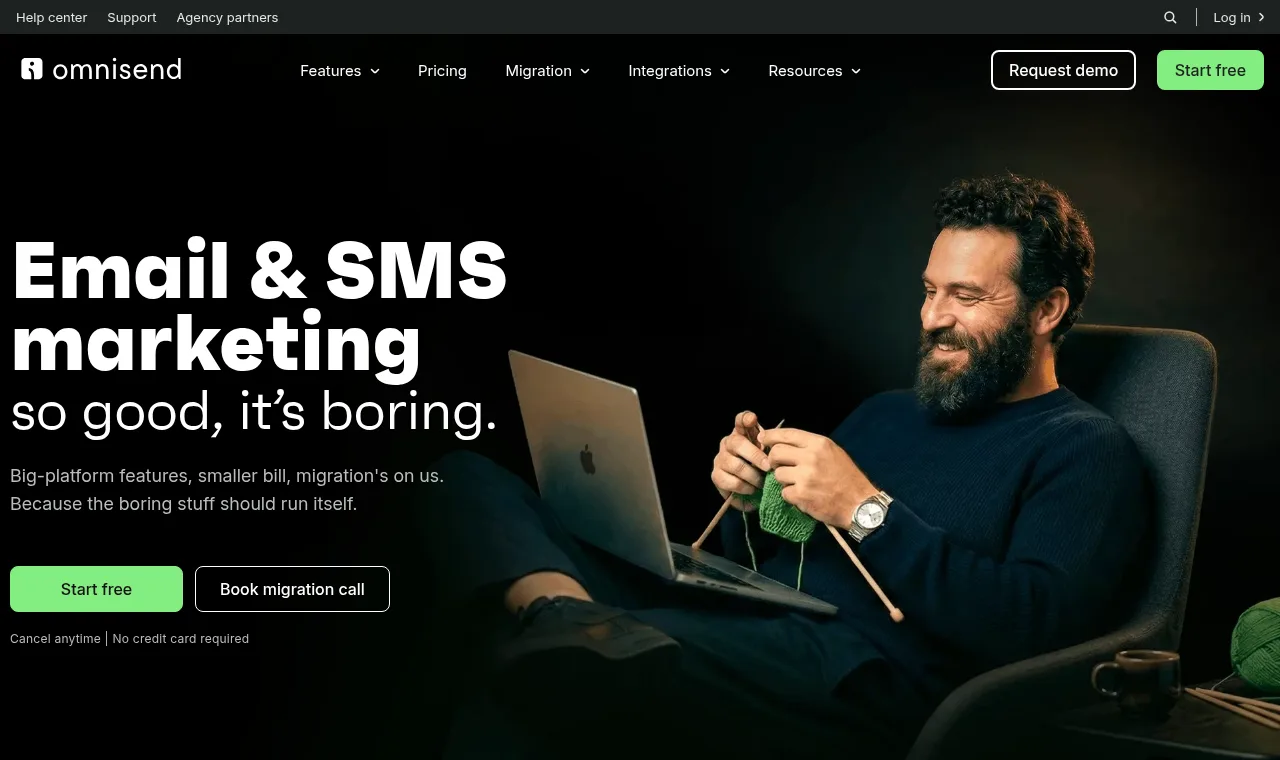
Omnisend is a marketing platform for online stores. It sends email, SMS and web push from one place.
It started in 2014 under the name Soundest. It became Omnisend in 2017. It is based in London.
It is not a general newsletter tool with store features added later. Store data sits at its core.
Every flow can react to a cart, an order, a view or a signup.
That focus is the main reason I review it on a coupon site. Store owners ask me about it every week.
Who I am and how I researched this
I am Roshan Jha. I work on SEO and content for ecommerce and SaaS brands.
For this review I read the full pricing page and the discount codes page. I also read the 2026 pricing help article.
I also worked through the onboarding, campaign, automation and form guides.
I did not buy a paid plan for this update. I say so wherever it matters.
Anything I could not confirm on an official page is marked UNKNOWN.
Setup: first impressions
Setup starts with connecting your store. On Shopify you install the app from the App Store.
WooCommerce, BigCommerce, Wix and several others also connect natively.
Once connected, contacts, orders and products sync into Omnisend.
The help center lists what to do before you begin. It covers your sender domain and your contact import.
My tip: verify your sending domain on day one. It protects your deliverability later.

Email builder and templates
The builder is drag and drop. You do not need any code.
Ecommerce blocks are the real time saver. You can add a product picker, a discount code block or recommendations.
The Black Friday hub also lists a live countdown timer. It updates each time an email is opened.
Templates cover welcome, sale, product launch and holiday emails.
My take: a store owner can build a clean product email in minutes.
Designers who want full HTML control may find it a little rigid.
Automation: where Omnisend shines
Automation is the strongest part of Omnisend.
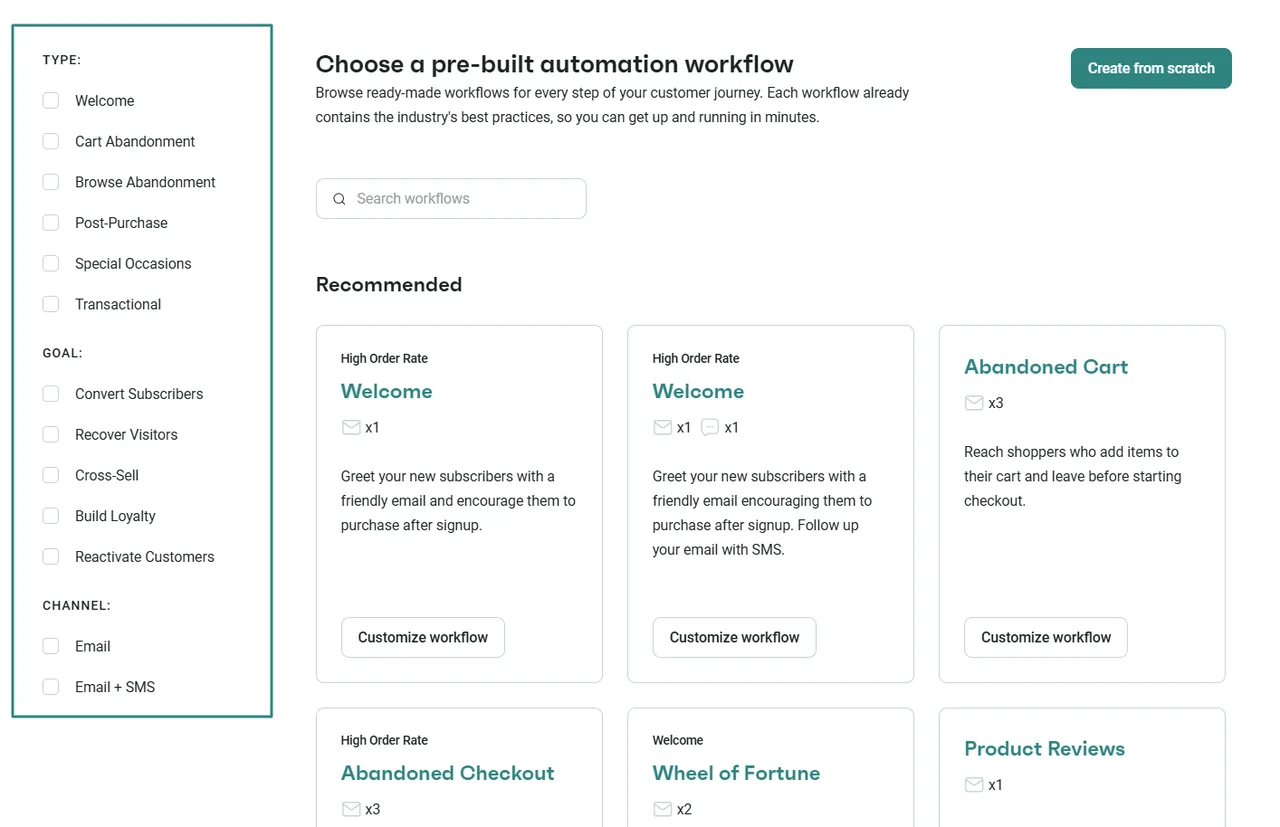
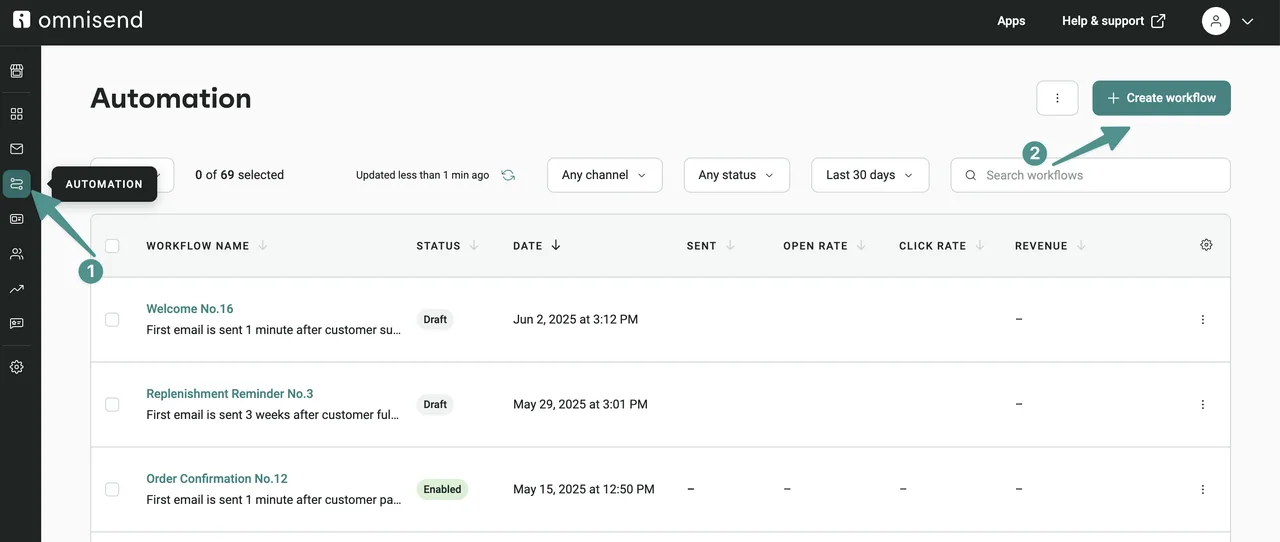
You get ready made workflows for welcome, cart abandonment, browse abandonment and post purchase.
There are also order confirmation, shipping confirmation, birthday, cross sell and win back flows.
Inside a flow you can add delays, conditional splits and A/B splits.
You can mix email, SMS and push in the same workflow.
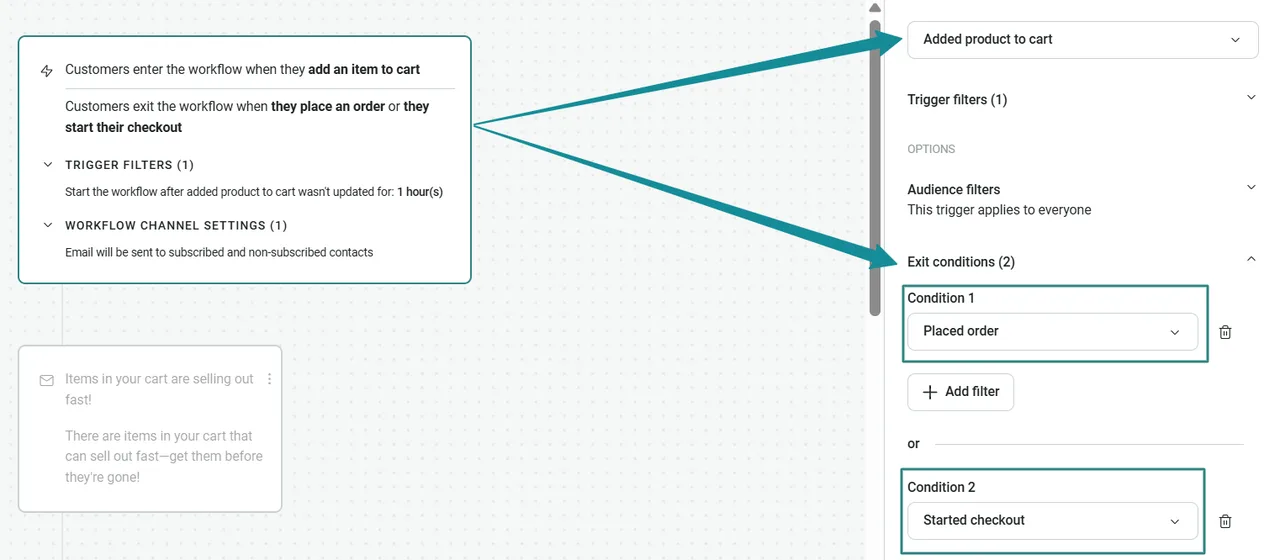
Exit conditions stop a flow once a shopper buys. That keeps you from nagging buyers.
My advice: turn on welcome, cart and browse flows first. They usually bring the earliest sales.
Segmentation and the AI segment builder
Segments can use orders, browsing, campaign activity and profile data.
Omnisend also lists an AI Segment Builder. You describe the audience in plain words.
It returns a working segment you can edit.
Segments can also trigger flows when a contact enters or leaves them.
For a small store, this is more than enough targeting power.
SMS and web push
SMS changed in 2026. From 4 May, new paid users need Pro to buy SMS credits.
SMS is not included in the Pro price. You buy an SMS Credits Subscription on top.
Rates start at $0.007 per SMS. The real rate depends on your volume and country.
Legacy Pro retires on 26 October 2026. Those accounts move to current Pro automatically.
Web push is simpler. Standard includes unlimited push notifications.
My take: if SMS matters, budget for Pro plus credits from day one.
What is new in 2026
Omnisend lists several AI tools on its pricing page. They include Forms AI and Reports AI.
Forms AI builds a full form design from a prompt.
Reports AI answers questions about your results in plain language.
Pro adds dynamic content AI and a personalized product recommender.
There is also an Omnisend MCP. It lets you check results and build campaigns from an AI tool.
Send time optimization picks the best hour for each contact. It needs Pro or a paid add on.
Signup forms in depth
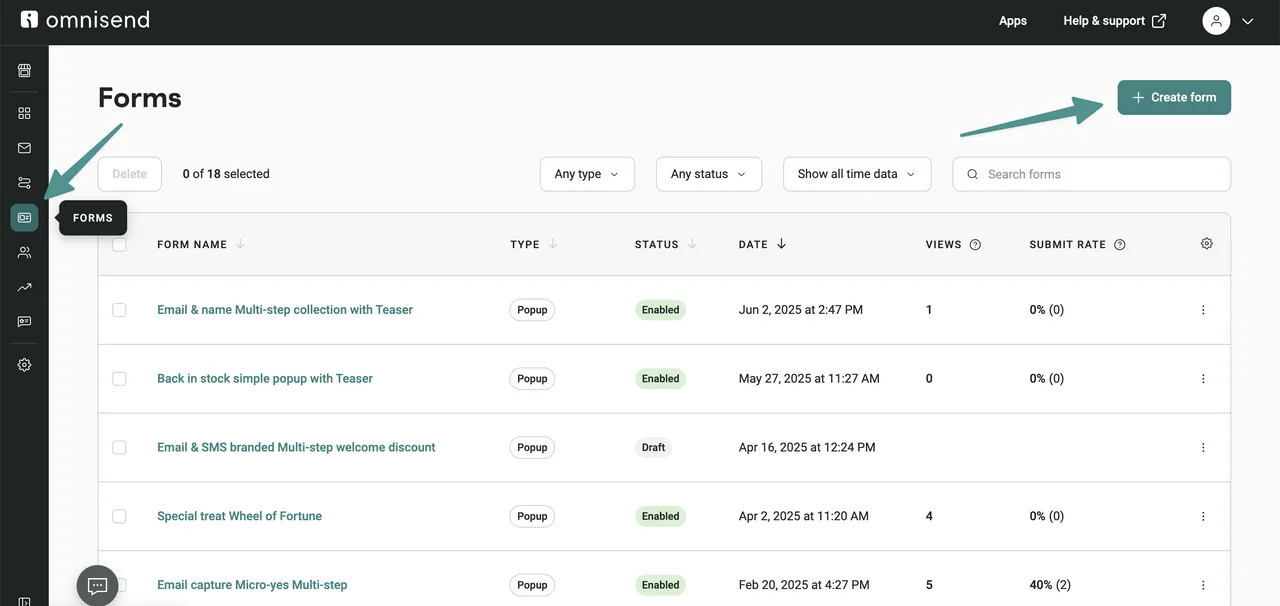
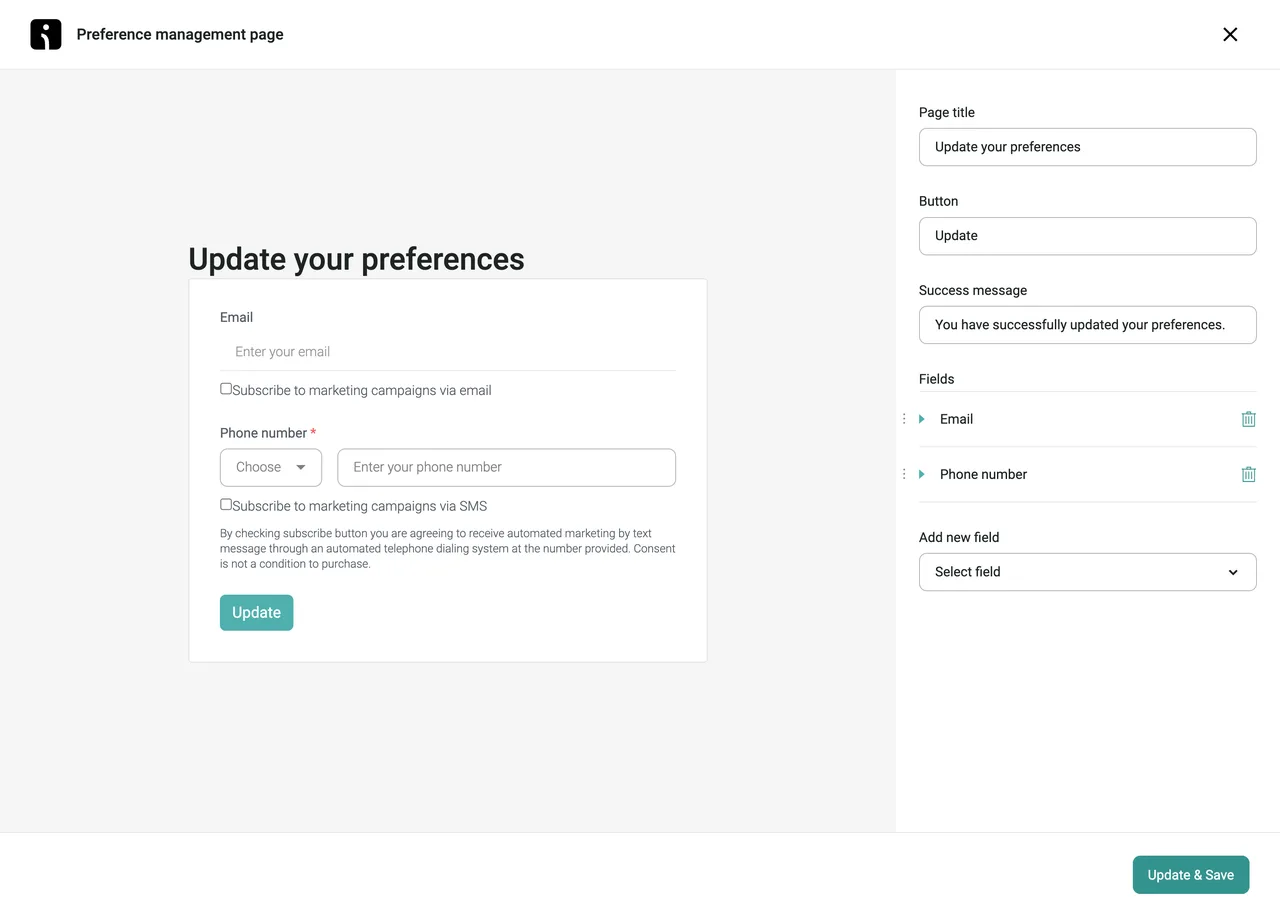
Forms are where list growth starts. Omnisend gives you several types.
You can build popups, flyouts, embedded forms, fullscreen forms and landing pages.
Gamified options include a wheel of fortune, a scratch card and a mystery box.
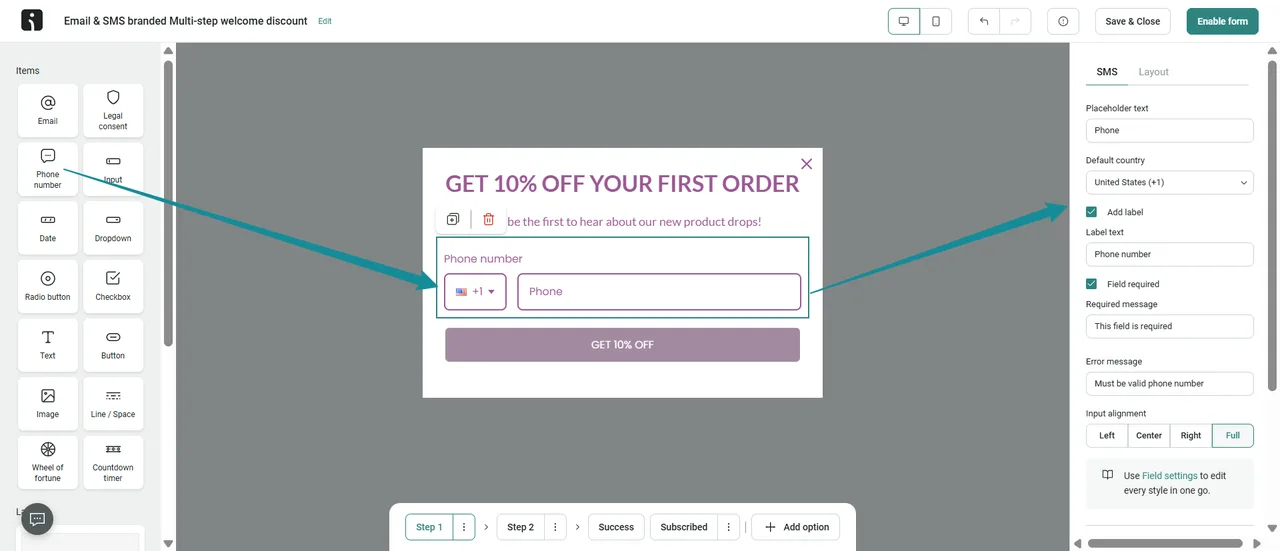
Multi step forms ask for email first, then phone number.
A teaser can stay on screen after a visitor closes the popup.
Forms can show static or unique discount codes.
You can A/B test forms and schedule when they appear.
There is also a back in stock form that feeds an automation.
My tip: start with one popup and one embedded footer form. Add games later if needed.
Campaign tools
Campaigns cover email, SMS and push.
You can A/B test subject lines and content. A guide explains how.
Campaign Booster resends a campaign to people who did not open it.
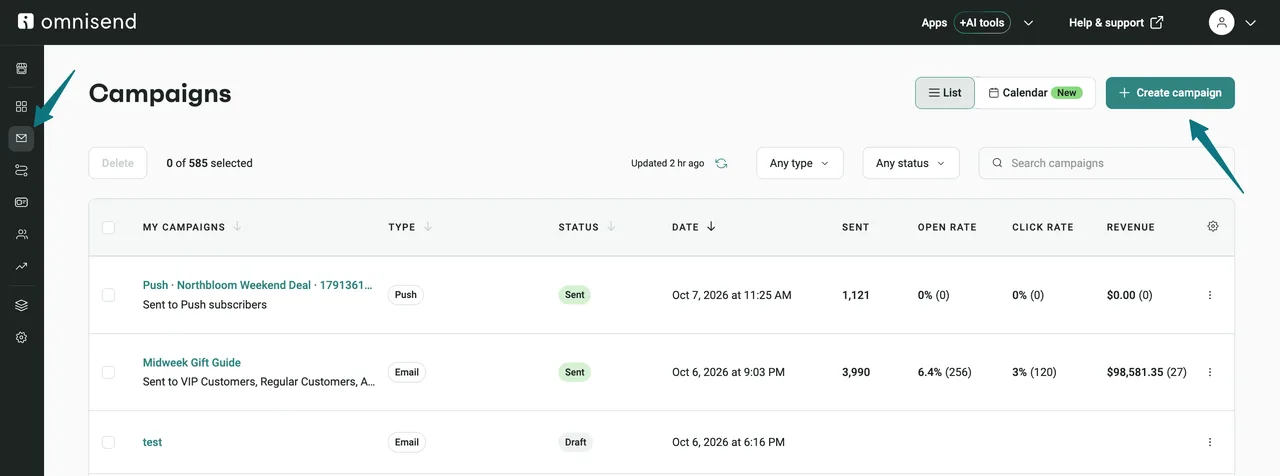
You can schedule campaigns and view them in a list or calendar.
You can also auto post email campaigns to Facebook.
My take: Campaign Booster is an easy win. Use it on your big sale emails.
The flows I would build first
Welcome series: greet new subscribers and deliver any promised code.
Abandoned cart: remind shoppers who left items in the cart.
Browse abandonment: follow up on product views without a cart.
Post purchase: thank buyers and suggest a related product.
Win back: reach customers who have not bought in a while.
Replenishment: remind buyers when a consumable product may run out.
Omnisend has a ready workflow for each of these.
Build them in this order. Each one adds sales with no extra sends from you.
Free vs Standard vs Pro: what really changes
Free includes campaigns, automations, forms, segmentation and web push.
It also syncs audiences to Google Customer Match and Facebook Custom Audiences.
Free keeps Omnisend branding on your emails and forms.
Paid plans add custom workflows, dynamic content blocks and AI tools.
Standard caps emails at your contact count times 12 per billing cycle.
Pro removes the email cap and opens SMS credits.
Pro also adds advanced reporting and personalized send times.
My rule: move to Standard once you pass 250 contacts. Move to Pro when you need SMS or unlimited sends.
Shopify specific features
Omnisend can replace Shopify default emails, such as order confirmations.
It supports Shopify Online Store 2.0 app embeds.
It can use Shopify Markets data for multi country stores.
Contact data syncs from Shopify, and the help center explains how.
Compliance and consent
Omnisend supports double opt in and an alternative double opt in setup.
It has a help collection on marketing compliance.
SMS needs clear consent in most countries. Check local rules before you text anyone.
Free migration
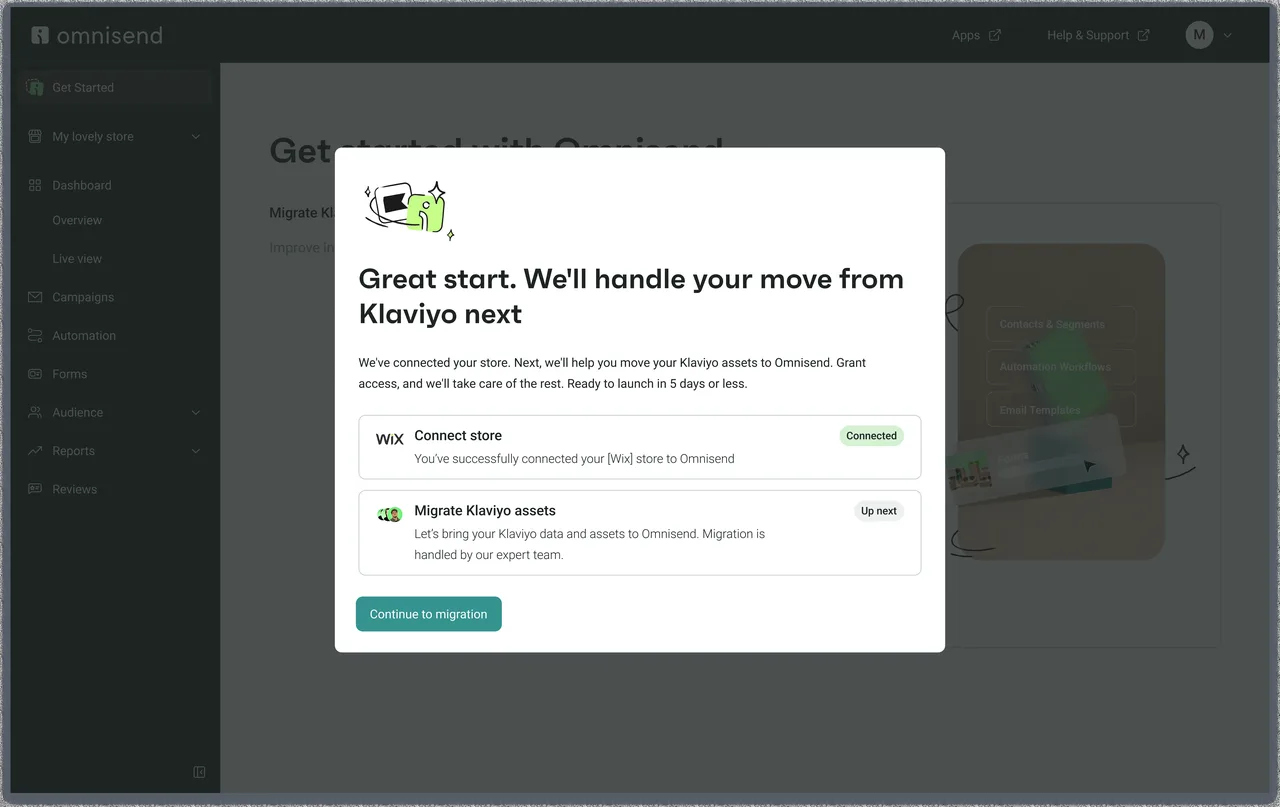
Omnisend offers a free migration service. Its page says the team moves flows, lists and templates in 5 days.
It runs migration guides for Klaviyo, Mailchimp, ActiveCampaign, Yotpo and other tools.
Omnisend claims stores leaving Klaviyo can see an invoice up to 35% smaller. That is a vendor claim.
My take: free migration removes the main reason people stay put.
Integrations
Native one click integrations cover Shopify, BigCommerce, WooCommerce, WordPress, Wix and Shoplazza.
Ecwid, PrestaShop, nopCommerce, Big Cartel and SureCart also connect.
Other platforms can connect through the API and a tracking snippet. That needs a developer.
Omnisend says it has more than 305 integrations in its app market.
Reporting and analytics
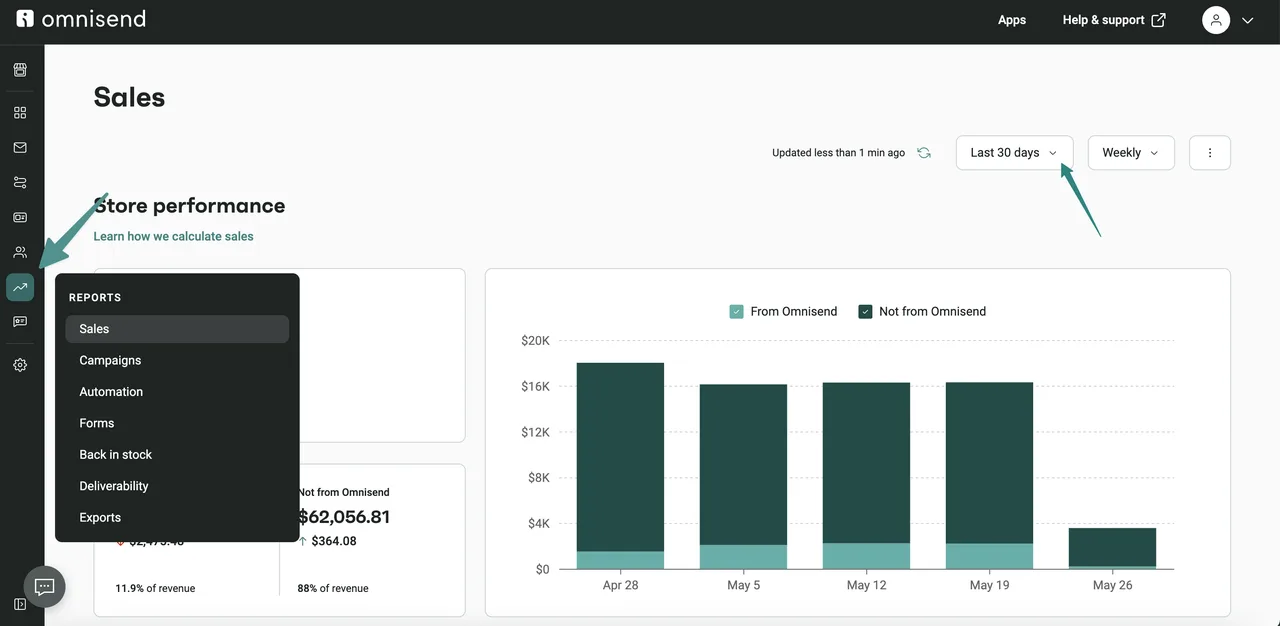
The sales report shows revenue by campaign and by workflow.
Advanced reporting sits on Pro. It compares email and SMS results in one view.
Reports AI can summarize what happened in a campaign.
My take: reporting is clear for small teams. Data heavy brands may want more depth.
Deliverability
Omnisend has help guides on keeping campaigns out of spam and on Gmail tabs.
Its Black Friday hub covers Q4 deliverability triage.
Your own habits matter most. Clean lists and steady sending beat any tool feature.
Customer support
Support is 24/7 by live chat and email. That covers every plan, including Free.
Accounts paying $400 a month or more get a dedicated account expert.
Few rivals give live chat to free users. It is a real advantage for new stores.
Landing pages
Omnisend can build a landing page signup form. It lives on its own URL.
Use it for giveaways, early access lists or a product waitlist.
It is not a full website builder. Keep pages short and focused on one signup.
My take: for a store, this covers most list building pages you need.
Testing emails before you send
You can send test emails before a campaign goes out.
The help center explains test email sending limits.
It also lists email safe fonts and tips on Gmail tabs.
A built in inbox preview or spam score tool is UNKNOWN from my check.
My tip: send every test to a Gmail and an Outlook inbox first.
Web push in practice
Web push sends a browser notification to shoppers who allow it.
It needs no email address or phone number.
Standard and Pro include unlimited push notifications.
I use push for flash sales and back in stock alerts.
Keep push rare. Too many alerts lead people to block them.
Using Omnisend on WooCommerce
WooCommerce connects through the official WordPress plugin.
The help center has a guide for connection issues on WordPress.
Once connected, orders, products and carts sync like on Shopify.
My take: WooCommerce stores get nearly the same feature set. That is rare among rivals.
Using Omnisend on BigCommerce and Wix
BigCommerce connects natively. Guides cover Stencil snippets, custom domains and push setup.
Wix connects for both stores and bookings.
Wix Bookings support means service businesses can also use flows.
Check the supported features list for your platform before you commit.
Omnisend AI tools explained
Forms AI writes and designs a signup form from a short prompt.
Reports AI turns your campaign data into plain answers.
The AI Segment Builder turns a plain sentence into a segment.
Dynamic content AI and the product recommender sit on Pro.
The recommender studies browsing and buying to pick products for each email.
My take: these tools save time. They do not replace a clear offer.
Omnisend MCP for AI assistants
Omnisend lists an MCP connection on its pricing page.
It lets you check performance and create campaigns from an AI tool.
You can also manage segments the same way.
This suits teams that already work inside AI assistants every day.
Multi store and agencies
Omnisend has a partner program for agencies.
The help center lists a collection for partners.
Multi store management details per plan are UNKNOWN from my check.
If you run several stores, ask support how billing works across them.
Security and trust signals
Omnisend runs a public bug bounty program, per its help center.
It has a marketing compliance collection covering consent rules.
Account experts on large plans review performance with merchants.
Learning resources
The help center is large and well organized.
It covers onboarding, campaigns, automation, forms, reports and billing.
Omnisend also runs webinars and a blog with a Black Friday hub.
New users can learn the whole tool from these guides alone.
How Omnisend compares to Shopify Email
Shopify Email, now called Shopify Messaging, includes 10,000 free emails a month.
After that it costs $1 per 1,000 emails.
It is fine for a new store with simple needs.
Omnisend is the step up when you need deeper flows, SMS and A/B tests.
How Omnisend compares to Mailchimp and Brevo
Mailchimp serves many business types. Omnisend focuses on stores.
Mailchimp shows Essentials from $13 a month on its pricing page.
Brevo prices by emails sent. Its Starter plan shows $9 a month.
For a store owner, Omnisend packs more ecommerce flows into its entry plan.
Omnisend for different kinds of stores
Fashion stores lean on browse abandonment and new arrival campaigns.
Product picker blocks make those emails quick to build.
Beauty and wellness stores gain most from replenishment reminders.
Omnisend has a ready replenishment workflow for that.
Food and drink stores often use SMS for flash offers. That now means Pro.
Gift shops get value from birthday flows and holiday campaigns.
Home goods stores with high prices should focus on cart and browse flows.
Stores that sell services can use Wix Bookings with Omnisend.
Pure digital creators without a store get less from it. A newsletter tool may suit them better.
Getting ready for Black Friday with Omnisend
Omnisend runs a Black Friday hub with guides and templates.
Its checklist dates Black Friday 2026 to 27 November. Cyber Monday is 30 November.
It suggests teaser emails from mid October.
Countdown timers and send time optimization help in the final hours.
Test your discount codes and flows a week before the sale.
My tip: grow your list in October with a strong popup. That list does the work in November.
What merchants say
On 20 October 2026, the Shopify App Store rated Omnisend 4.7 out of 5.
That rating came from 3,193 reviews.
About 166 of those reviews gave 1 star.
My take: a 4.7 rating over thousands of reviews is a strong signal.
Key 2026 changes at a glance
These dates come from the official pricing help article.
4 May 2026: SMS credits require Pro for new paid users.
26 October 2026: Legacy Pro retires and moves to current Pro.
The Black Friday hub also lists new AI features for the season.
Check the help article again before you buy. Rules can change.
A plain English glossary
Flow or workflow: an automated series of messages started by a trigger.
Trigger: the event that starts a flow, like an abandoned cart.
Segment: a group of contacts that match set rules.
Email credits: the number of emails you can send each billing cycle.
Campaign: a one time message sent to a chosen audience.
Web push: a browser alert sent to visitors who allowed it.
Conditional split: a fork in a flow based on a contact detail.
Omnisend keeps a fuller glossary in its help center.
Deliverability habits that matter more than tools
Send to people who engaged in the last 90 days first.
Remove hard bounces quickly.
Keep a steady sending rhythm. Sudden spikes hurt reputation.
Use a clear sender name that shoppers recognize.
Make unsubscribing easy. It protects your spam rate.
Avoid buying lists. Bought contacts damage deliverability fast.
Warm up a new domain with small sends to your best buyers.
Watch spam complaints after every big campaign.
Check your sender domain records after any DNS change.
Omnisend help guides cover spam, Gmail tabs and paused sending.
Automation settings worth knowing
Frequency settings stop one contact from getting the same flow too often.
Retrospective triggering can run a new flow for past events.
You can build a test segment to try a flow on yourself first.
Flows can start when a contact enters or leaves a segment.
Delays can be set in minutes, hours or days.
You can edit a live flow. The help center explains what changes for contacts already inside.
My tip: test every new flow on a test segment first.
SMS features beyond basic texts
You can add SMS steps inside any automation.
You can retarget email non openers with an SMS campaign.
SMS campaigns have their own builder and scheduling.
Two way texting depth is UNKNOWN from my check.
Remember the 2026 rule. New paid users need Pro for SMS credits.
Reports I check every week
Sales by workflow, to see which flows earn the most.
Sales by campaign, to compare offers and subject lines.
Open and click rates, to spot list fatigue early.
Unsubscribes after each campaign, to catch bad timing.
Form signups, to see which popup grows the list fastest.
How Omnisend compares to ActiveCampaign and Drip
ActiveCampaign Starter shows $15 a month billed yearly for 1,000 contacts.
It is stronger for CRM and B2B lead nurture.
Drip shows $39 a month at its entry list size. It offers a 14 day trial.
Drip lists live chat only from its $99 a month plans.
Want SMS and round the clock help? Omnisend is the simpler pick.
Common scenarios and my pick
A new Shopify store with 200 subscribers: Omnisend Free.
A WooCommerce store with 1,500 buyers and weekly emails: Standard.
A beauty brand with 4,000 contacts that texts often: Pro plus SMS credits.
A store with 20,000 contacts emailing daily in Q4: Pro, since emails are unlimited.
A store moving from Klaviyo: ask for the free migration, then compare invoices.
A blog with no products: a newsletter tool, not Omnisend.
A store with two brands: ask support about multi store billing first.
A store that only needs order emails: Shopify defaults may be enough.
These picks follow the official plan limits. Your numbers may shift them.
Seasonal campaign planning
The help center has a collection on holiday and seasonal campaigns.
Plan around four peaks. Think Valentine’s Day, Mother’s Day, back to school and BFCM.
Build one segment of recent buyers and one of browsers for each peak.
Send buyers a loyalty style offer. Send browsers a reminder of what they viewed.
Schedule campaigns in the calendar view so nothing overlaps.
My tip: write your holiday emails in September, not in November.
What I would change about Omnisend
I would show SMS credit costs right next to the Pro price.
I would add a cost calculator that includes SMS and push together.
I would explain the Standard email cap on the plan card itself.
I would list the AI tools per plan in one simple table.
I would add a public status page link inside the app.
I would also show the YOUFOUNDIT code inside the upgrade screen for Free users.
I would publish a full report list per plan.
I would add a clear Pro trial so stores can test SMS before paying.
None of these are deal breakers. They would make buying decisions faster.
App integrations worth adding
Omnisend has a help collection for app integrations.
Its app market groups apps by email capture, loyalty, advertising, subscriptions and email building.
Product review apps can trigger review request flows.
Loyalty apps can feed points data into segments.
Ad audience sync sends segments to Google and Facebook.
Add only what you will use. Each app adds data to manage.
Support in detail
Live chat and email support run 24/7 on all plans.
Omnisend says this has always been the case, including Free.
Plans of $400 a month or more get an account expert.
Account experts meet merchants to review results.
The help center adds guides for nearly every task.
My take: support is one of the best reasons to choose Omnisend.
Email credits explained
Standard uses email credits. Your credits equal your contact count times 12 per billing cycle.
Omnisend gives an example. 3,000 contacts means 36,000 emails a month.
That is about three emails a week to every contact.
Flow emails count too. A busy cart flow can eat credits fast.
Pro removes the cap. You can send unlimited emails.
My take: emailing everyone more than three times a week? Price Pro.
How SMS billing works now
SMS credits are a separate subscription on Pro.
Rates depend on your monthly SMS spend and the country you text.
For Legacy Pro users, a credits subscription may be added at migration.
Omnisend says this depends on your last 30 days of SMS use.
It is first billed on your next Pro billing cycle, not on migration day.
If carried over credits run out early, you can top up.
Some Standard users can keep legacy SMS rates. They needed an active SMS subscription before 4 May 2026.
That only applies if they keep the legacy setup active.
Billing, downgrades and cancelling
The help center has a guide to understand your paid plan charges.
Another guide covers how to downgrade, cancel or freeze your subscription.
Read both before you upgrade. You will know your exit options.
My tip: set a calendar reminder before any discount period ends.
YOUFOUNDIT and the upfront saving both last 3 months. Then regular prices apply.
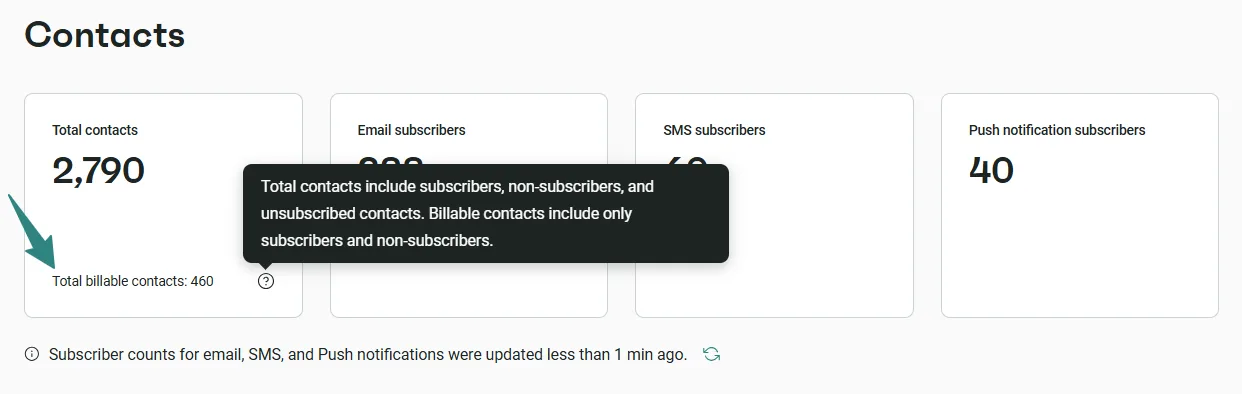
The free plan contact limit
Free lets you upload unlimited contacts.
You can only send campaigns to a segment of 250 contacts or fewer.
Contacts outside that segment get no emails until you upgrade.
So build a segment of your best 250 contacts first.
Engaged buyers and recent signups are the best picks.
Questions to ask before you buy
How many contacts will I have in six months?
Will I need SMS, or is email enough?
Does my store platform connect natively?
Do I need live support outside office hours?
Will I send more than 12 emails per contact each month?
If you answer yes to SMS or heavy sending, plan for Pro.
If not, Standard is likely enough.
Who should not use Omnisend
Bloggers and creators who sell no products.
B2B teams that need a full sales CRM.
Enterprises that need custom data warehouses and deep attribution.
Teams that want SMS but refuse to pay for Pro.
For these users, a different tool will often fit better.
Final checklist before you sign up
Confirm your store platform connects natively.
Count your contacts and estimate monthly sends.
Decide if SMS is a must have this year.
Read the official discount codes page for current offers.
Start on Free and build your three core flows.
Upgrade only when Free limits block real sales.
Feature scorecard
Here is how I score each area after reading the official docs.
Scores are my opinion. They are not paid placements.
Mistakes I see new users make
Importing old, unengaged contacts and emailing all of them on day one.
Sending campaigns before the welcome and cart flows are live.
Skipping sender domain setup.
Buying Pro for SMS without a plan to collect phone numbers.
Ignoring reports after the first week.
My 30 day plan for a new Omnisend account
Week 1: connect the store, verify the domain and add one popup.
Week 2: turn on welcome, cart and browse flows.
Week 3: send two campaigns to engaged contacts and test subject lines.
Week 4: review sales by flow and campaign. Decide if you need Standard or Pro.
This plan costs nothing on Free. You learn what Omnisend earns before you pay.
Who Omnisend is built for
It fits small and mid size online stores.
It suits teams who want email, SMS and push without three separate tools.
It is a weaker fit for content creators who sell no products.
Very large brands with complex data teams may prefer a deeper platform.
How Omnisend compares to Klaviyo
Both free plans cap at 250 contacts and 500 emails a month.
Omnisend shows clear public prices. Klaviyo uses a live calculator, so its entry price is UNKNOWN here.
Omnisend gives 24/7 support on every plan. Klaviyo is known for deeper data tools.
| Feature | Score out of 5 | Why |
|---|---|---|
| Store integrations | 5 | Native on major platforms |
| Automation | 5 | Many ready flows with splits |
| Forms | 4.5 | Many form types and games |
| Email builder | 4 | Fast ecommerce blocks |
| Segmentation | 4 | AI builder plus store data |
| SMS | 3.5 | Strong but Pro only now |
| Reporting | 3.5 | Clear but lighter than data heavy rivals |
| Support | 5 | 24/7 on every plan |
| Value | 4.5 | Free plan and clear pricing |
Omnisend pricing in 2026, from official pages
These figures come from the official pricing page and the 2026 pricing help article.
| Plan | Price | What you get |
|---|---|---|
| Free | $0 | 250 contacts, 500 emails a month |
| Standard | From $16 a month | Email credits equal contacts x 12. No SMS for new users |
| Pro | From $59 a month | Unlimited emails. SMS sold separately from $0.007 per SMS |
| Account expert | Included | Only on plans of $400 a month or more |
Since 4 May 2026, new paid users need Pro to buy SMS credits. Legacy Pro retires on 26 October 2026. Source: Omnisend Pricing Plans 2026.
Real cost examples
| Store size | Likely plan | Monthly cost |
|---|---|---|
| Under 250 contacts | Free | $0 |
| 500 contacts | Standard | From $16 |
| 2,500 contacts, heavy sending | Pro | From $59 |
| Any size with SMS | Pro plus SMS credits | $59 plus SMS usage, exact total UNKNOWN |
Prices rise with your contact count. Check the slider on the pricing page for your size.
Ways to cut your Omnisend bill
These are the only savings Omnisend lists on its own site.
- YOUFOUNDIT: 10% off Standard or Pro for the next 3 months. It works for new and existing Free plan users.
- Pay upfront: new subscribers save 30% on Standard or Pro. It covers the first 3 months.
- Free plan: 250 contacts and 500 emails a month, with no card needed.
You enter YOUFOUNDIT under Store settings, then Pricing and usage, at checkout.
Omnisend says codes on other coupon sites are not valid.
Getting started with Omnisend in five steps
This is the order I would follow on a new store. Each step links to the official guide.
Step 1: Connect your store
Install Omnisend from your store app market. Then check that orders and products synced. Guide: Omnisend help center.
Step 2: Add a signup form
Create a popup with a clear offer. Show it after a short delay, not on page load. Guide: Omnisend help center.
Step 3: Turn on abandoned cart
Enable the ready made cart workflow. Keep the first email within a few hours. Guide: Omnisend help center.
Step 4: Send your first campaign
Send a welcome or best sellers campaign to your engaged contacts first. Guide: Omnisend help center.
Step 5: Check your reports
After a week, open Reports. Keep what sells and pause what does not. Guide: Omnisend help center.
Pros and cons
Pros
- Free plan that never expires
- 24/7 support on every plan
- Strong ready made ecommerce flows
- Free migration service
- Clear public pricing
Cons
- SMS needs Pro for new users
- Standard caps emails at contacts x 12
- Advanced AI tools sit on paid plans
- Reporting is lighter than data heavy rivals
My verdict
I checked every official page on 20 October 2026.
For most online stores, Omnisend is good value. Its flows and support stand out.
Start on Free. Upgrade when your flows start paying for themselves.
FAQ
Is Omnisend worth it?
For most online stores, yes. It covers email, SMS and push in one tool.
Is Omnisend free?
Yes. The Free plan covers 250 contacts and 500 emails a month.
Does Omnisend have a discount code?
Yes. YOUFOUNDIT gives 10% off Standard or Pro for the next 3 months.
Is SMS included in Pro?
No. Since 4 May 2026, new users buy SMS credits separately from $0.007 per SMS.
Does Omnisend work with WooCommerce?
Yes. It connects natively.
Can Omnisend move my data from Klaviyo?
Yes. It offers a free migration service.
Does the Free plan include automations?
Yes. Free includes campaigns, automations, forms and segmentation.
Can I remove Omnisend branding?
Yes, on paid plans. Free keeps the branding.
When does Legacy Pro end?
On 26 October 2026. Accounts move to current Pro automatically.
Does Omnisend offer a free trial of Pro?
UNKNOWN. Omnisend lists a Free plan, not a Pro trial.
Related reading
Try it yourself
The Free plan is the safest test. Use your real store data for two weeks.
Start Omnisend free [AFFILIATE LINK]
Sources
- Omnisend pricing
- Omnisend Pricing Plans 2026
- Omnisend discount codes
- Omnisend integrations
- Omnisend Black Friday hub

About the author: Roshan Jha
Roshan Jha is an SEO expert focused on helping brands grow through search-first content strategy, technical SEO, and data-driven digital marketing. He specializes in building scalable organic growth systems, covering keyword research, on-page optimization, topical authority, site audits, and conversion-focused content planning. With a practical, results-oriented approach, Roshan works with businesses to improve rankings, increase qualified traffic, and turn visibility into measurable revenue. Follow Roshan Jha on LinkedIn.
Roshan Jha on LinkedIn