

Disclosure: some links on this page can earn us a commission. Buying this way never raises your price. This site is independent. It is not owned by, run by or affiliated with Omnisend.
Last verified: Roshan Jha checked this on 21 October 2026.
What changed: New guide. Every step was checked against the official help center.
Quick verdict: Cancel to Free if you may return. Freeze for $50 if you pause for months. Delete only when you leave for good.
Cancelling Omnisend is simple. The traps are timing, Shopify uninstalls and the refund rules.
You signed up to grow your list. Now the bill keeps coming, and the season is over. Or you found a tool that fits better. Either way, you want out without losing your data or paying one more month.
Here is the catch. Omnisend has four exit paths, and each one behaves differently. Pick the wrong one and you can lose every contact. Pick the right one and you pay nothing more.
Short answer: To cancel Omnisend, open Store Settings, then Pricing and usage, then Plan overview. Click the three dot menu and choose Cancel plan. Your paid plan runs until the cycle ends, then moves to Free. Charges are usually non refundable. A one time $50 freeze keeps your data for 12 months.
Why you should trust this guide
I have used Omnisend for my own campaigns. This guide sticks to what Omnisend documents.
Written by Roshan Jha. Here is how we researched it:
- Read the official cancel, refund and account help articles on 21 October 2026.
- Followed each step against the screenshots Omnisend publishes.
- Checked plan prices on the official pricing help page.
- Read 250 public Shopify App Store reviews for billing and support themes.
Last verified: 21 October 2026. What changed: First version of this guide.
Your four options at a glance
Omnisend lists four ways to stop or reduce paying. The table compares them using the help center wording.
| Option | Cost | When it starts | Data kept? | Best for |
|---|---|---|---|---|
| Downgrade | Prorated credit | Right away, new 30 day cycle | Yes | Fewer contacts, cheaper tier |
| Cancel to Free | $0 | End of billing cycle | Yes, but deleted after 3 months without login | Leaving for now, may return |
| Freeze for 12 months | $50 one time | End of billing cycle | Yes, up to 12 months | Seasonal stores, long breaks |
| Delete account | $0 | Right away or within 48 hours | No | Closing for good |
Source: Downgrade, Cancel, or Freeze Your Omnisend Subscription.
Why people cancel Omnisend
From the reviews we read, three reasons come up most. The list grew and the tier jumped. The store closed for the season. Or SMS rules changed after May 2026.
That last one matters. New paid users now need Pro to buy SMS. Legacy Pro also retires on 26 October 2026. So many owners are rechecking their plan right now.
How to cancel Omnisend, step by step
This follows the official help article. You need the Owner or Admin role. Managers and Analysts cannot change billing.
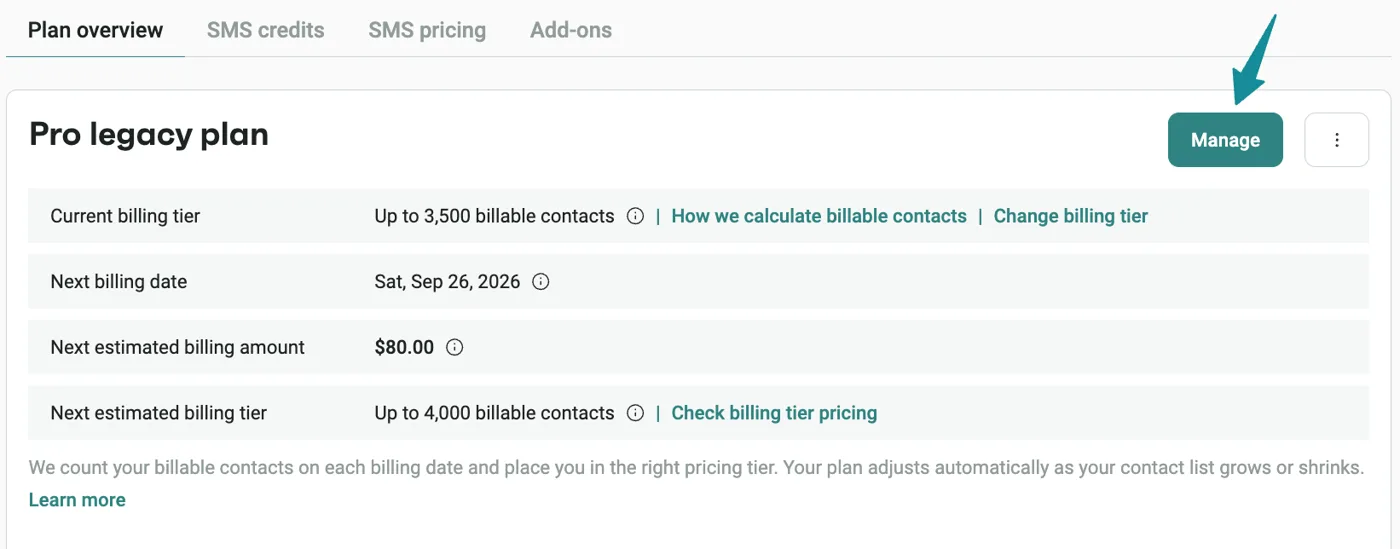
Step 1: Open Pricing and usage
Click Store Settings in the left sidebar. Then open Pricing and usage. Stay on the Plan overview tab.
Step 2: Choose Cancel plan
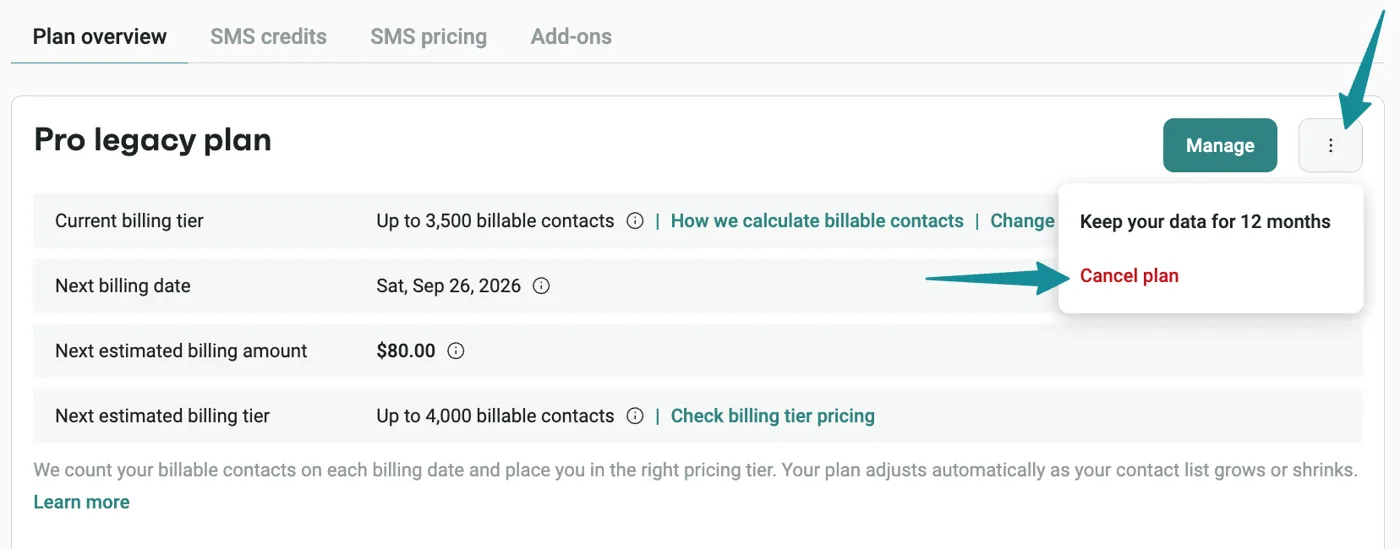
Click the three dot menu beside Manage. Pick Cancel plan from the list.
Step 3: Answer the short survey
A short wizard asks why you are leaving. Answer it and confirm. Omnisend then confirms the move to Free.
Step 4: Check what happens next
- Your paid plan stays active until the cycle ends.
- After that, multi step automations, A/B tests, advanced segments and SMS stop.
- Contacts, campaigns and reports stay in read only mode on Free.
- You can upgrade again at any time.
One warning stands out. A Free account with no login for 3 months gets deleted. Omnisend emails you 15 days and 5 days before that happens.
Freeze instead of cancel: the $50 option
Run a seasonal store? Freezing may be smarter. You pay a one time $50 fee. Omnisend keeps your account and data for up to 12 months.
- Your plan still runs to the end of the cycle.
- Paid features stop after that. Free features remain.
- Auto deletion is blocked, even with no logins.
- You can reactivate any time within 12 months.
- You can only freeze once every 12 months.
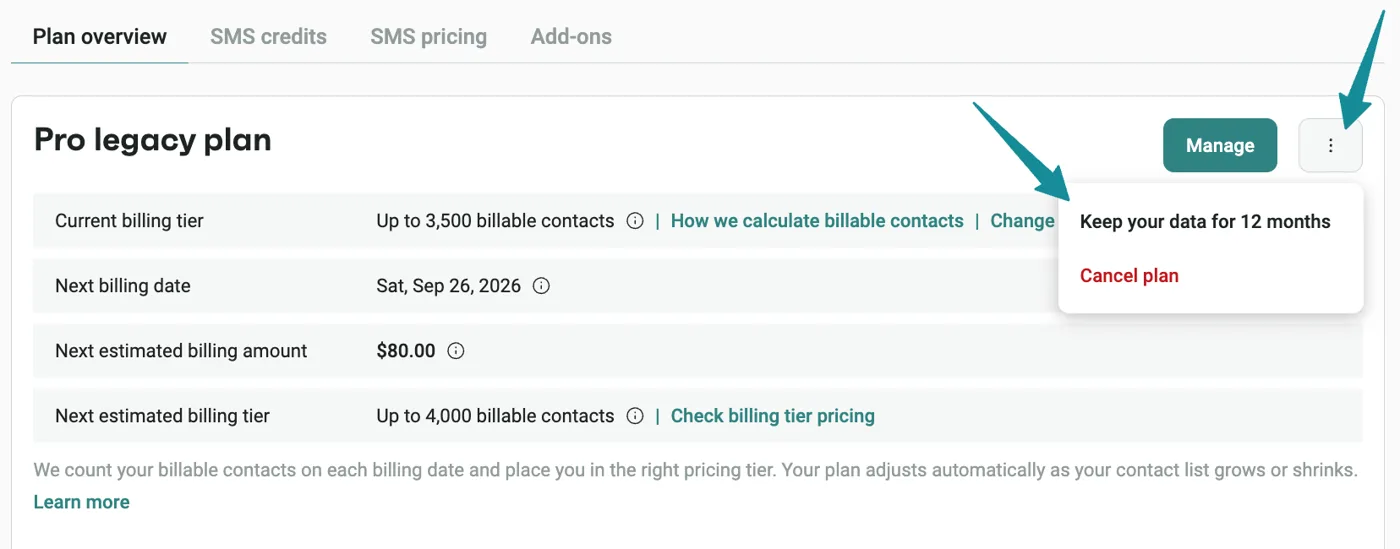
To freeze, open the same three dot menu. Choose Keep your data for 12 months. Then confirm and pay. The pricing help page adds VAT to the $50 fee.
The Shopify trap most guides miss
This catches many store owners. Removing the Omnisend app from Shopify cancels your paid plan. It also starts a deletion clock.
- Omnisend deletes the account 16 days after you uninstall the app.
- This applies even if you paid for a freeze.
- Reminder emails go out 10 days and 3 days after uninstalling.
- To keep data, leave the app installed or log in after a warning.
Need to uninstall but keep data? Contact support before you remove the app. That is the official advice.
How to downgrade instead of leaving
Maybe Omnisend still works, but the bill is too high. Downgrading is then the better move. It takes effect right away and restarts a 30 day cycle.
You get no refund for the switch. Unused credit is applied to the new plan instead. Here is the official example, simplified.
| Detail | Official example |
|---|---|
| Paid for Pro | $59 on 6 April |
| Downgraded to Standard | 20 April, 15 days in |
| Unused credit | $29.50 |
| Standard plan cost | $20 |
| Charged that day | $0 |
| Credit on next invoice | $9.50 |
There is one limit. Your new tier must fit your billable contacts. With 24,000 contacts, you cannot pick a 10,000 tier.
Pro users who joined after 4 May 2026 lose SMS on Standard or Free. Plan around that before you switch.
Omnisend pricing, so you know what you save
These are the prices on the official pricing help page, checked 21 October 2026.
| Plan | Price | Key limit |
|---|---|---|
| Free | $0 | 250 contacts, 500 emails a month |
| Standard | From $16 a month | Email only for new users |
| Pro | From $59 a month | Unlimited emails, SMS sold separately |
Full details live in our Omnisend pricing breakdown. Source: Omnisend Pricing Plans 2026.
Does Omnisend give refunds?
Usually, no. The refund policy says charges are non refundable. Plans are prepaid month to month and renew on their own.
Omnisend does list a few cases where it may refund.
- You used no features last month. That means no form signups, no sends and no paid add ons.
- You cancelled in time, but the cancellation failed.
- A system fault stopped you using what you paid for.
- Your account was hacked. A partial refund may apply.
Unused SMS credits and add ons are not refundable. A refund never exceeds what you paid, minus third party costs. Source: Omnisend Refund Policy.
How to ask for a refund
- Collect your invoice date and account name.
- Explain which refund case applies to you.
- Contact support by in app chat or email.
- Keep a copy of the reply.
Support is listed as 24/7 in the help center. Email is support@omnisend.com.
How to delete your Omnisend account for good
Deleting removes everything. Contacts, campaigns, automations and reports are gone. You cannot recover them.
- Export your contacts first from Audience.
- Email support@omnisend.com with your account name.
- Add your store or website URL.
- Wait for the confirmation. Omnisend says it takes up to 48 hours.
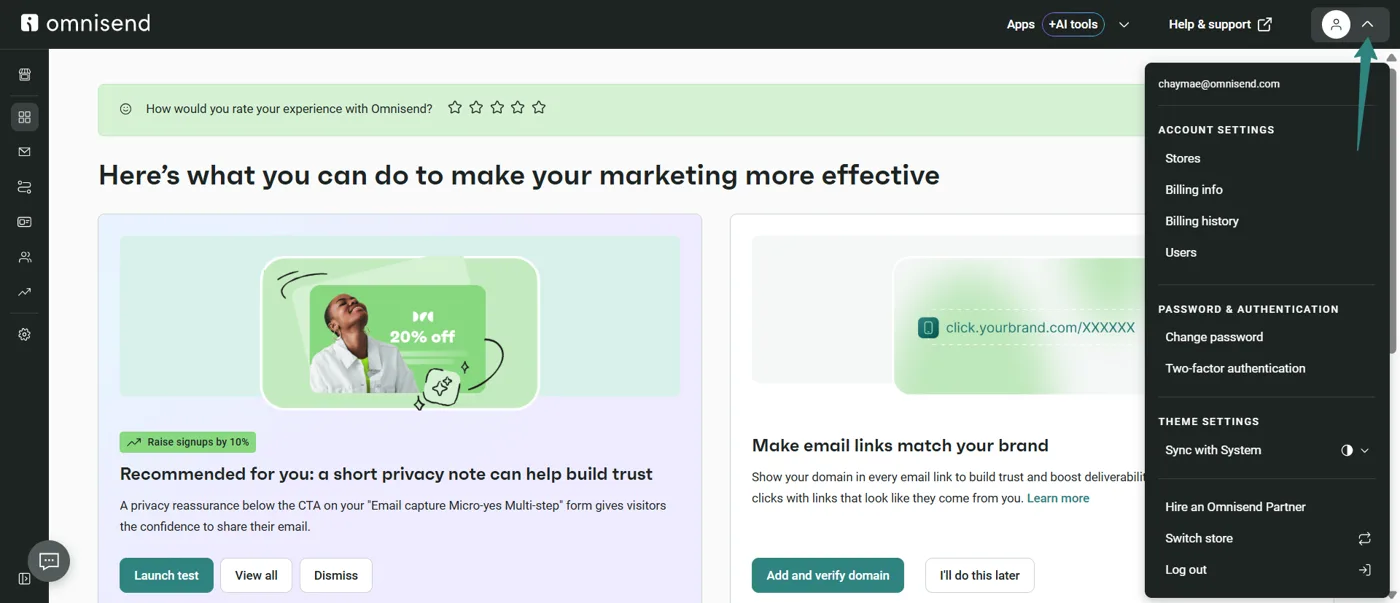
Settings for your profile and stores sit under the profile icon. That menu is shown below.
Cancel vs freeze vs delete: which should you pick?
| Your situation | Best choice | Why |
|---|---|---|
| Store is closing | Delete | No reason to keep data |
| Off season for 4 to 12 months | Freeze | Data is safe, no logins needed |
| Testing another platform | Cancel to Free | Costs nothing, easy to return |
| Bill too high, tool still useful | Downgrade | Keep core features, pay less |
| Leaving Shopify app for now | Talk to support first | Avoid the 16 day deletion |
What to do before you cancel
- Export contacts and segments.
- Screenshot your best flows and templates.
- Note your billing date. Cancel before it.
- Check for discounted or upfront pricing. It reverts to monthly at renewal.
- Switch off sending domains on your old tool last.
Thinking of leaving? Compare first
Leaving for a cheaper tool? Check what you would give up. Our Mailchimp alternatives guide compares the main email tools on price.
Not sure Omnisend was the issue? The full Omnisend review covers strengths and limits.
What real users say
These are exact public reviews from the Omnisend listing on the Shopify App Store. We picked ones about billing and support. Two are critical.
They will increase price for no reason, and stop giving you options to choose. the first time they over charged me by 70 dollars, I contacted them, got a refund, and this time they went from 30 40 a month to 80 a month, WITHOUT notifying me.
EqualRXN, Shopify App Store review (1 star), 13 November 2024. Read the original
Great app. every time I run in to an issue, the support team is always there 24/7 to help you. Thanks Mathías and Beran for your help.
cozmoz, Shopify App Store review (5 stars), 7 August 2026. Read the original
Help is always at the tip of my fingers on Omnisend. None of my questions are dumb and it's like having a personal tutor along side! I appreciate the support and the speed of answers.
LKC Creates, Shopify App Store review (5 stars), 20 May 2026. Read the original
Platform looks promising but its a mess so far… They are charging us 10K more contacts then Klaviyo was. Support is not helpful and super slow to respond. Very bad experience so far.
Field Made Co, Shopify App Store review (1 star), 17 June 2026. Read the original
Pros and cons of cancelling Omnisend
| Pros | Cons |
|---|---|
| Self serve, no call needed | Charges are usually non refundable |
| Free plan keeps your data | Free accounts delete after 3 idle months |
| Freeze option for seasonal stores | Freeze costs $50 and works once a year |
| Downgrade credit carries over | Shopify uninstall can trigger deletion |
Honest negatives
The refund policy is strict. Most mid cycle changes earn credit, not cash. The Shopify deletion rule is easy to miss. And the 3 month idle rule can wipe a Free account you forgot about.
Who should skip cancelling
Skip it if you only need fewer contacts. Downgrade instead. Skip it if you will be back within a year. Freeze instead.
Our take
I have used Omnisend myself, and the settings are easy to reach. The risk is not the click. It is what happens after. Freeze if you are seasonal. Cancel to Free if you are testing elsewhere. Delete only when you are sure.
Want to come back later at a lower price? See the current official offers on our Omnisend coupons page.
Check current Omnisend plans on the official pricing page
FAQ
How do I cancel my Omnisend subscription?
Go to Store Settings, then Pricing and usage, then Plan overview. Click the three dot menu and choose Cancel plan. Confirm after the short survey.
Does Omnisend refund unused time?
Usually not. Charges are non refundable. Omnisend may refund if you used no features. A failed cancellation or system fault may also qualify.
What happens to my data after I cancel?
It stays on the Free plan in read only mode. If you do not log in for 3 months, Omnisend deletes the account.
How much does it cost to freeze Omnisend?
A one time $50 fee, plus VAT. It keeps your data for up to 12 months.
Does uninstalling the Shopify app cancel Omnisend?
Yes. It cancels the paid plan. The account is then deleted 16 days later unless you act.
How do I delete my Omnisend account?
Email support@omnisend.com with your account name and store URL. Omnisend says it processes this within 48 hours.
Can I get a refund when I downgrade?
No. Unused credit moves to the new plan. Any excess comes off your next invoice.
Sources
- Omnisend Help Center: Downgrade, Cancel, or Freeze
- Omnisend Help Center: Pricing Plans 2026
- Omnisend Help Center: Refund Policy
- Omnisend Help Center: Manage Your Omnisend Account
- Shopify App Store: Omnisend reviews

About the author: Roshan Jha
Roshan Jha is an SEO expert focused on helping brands grow through search-first content strategy, technical SEO, and data-driven digital marketing. He specializes in building scalable organic growth systems, covering keyword research, on-page optimization, topical authority, site audits, and conversion-focused content planning. With a practical, results-oriented approach, Roshan works with businesses to improve rankings, increase qualified traffic, and turn visibility into measurable revenue. Follow Roshan Jha on LinkedIn.